How to Fix First Layer Issues on Bambu Lab (X1C, P1S, A1); Settings That Actually Work in 2026
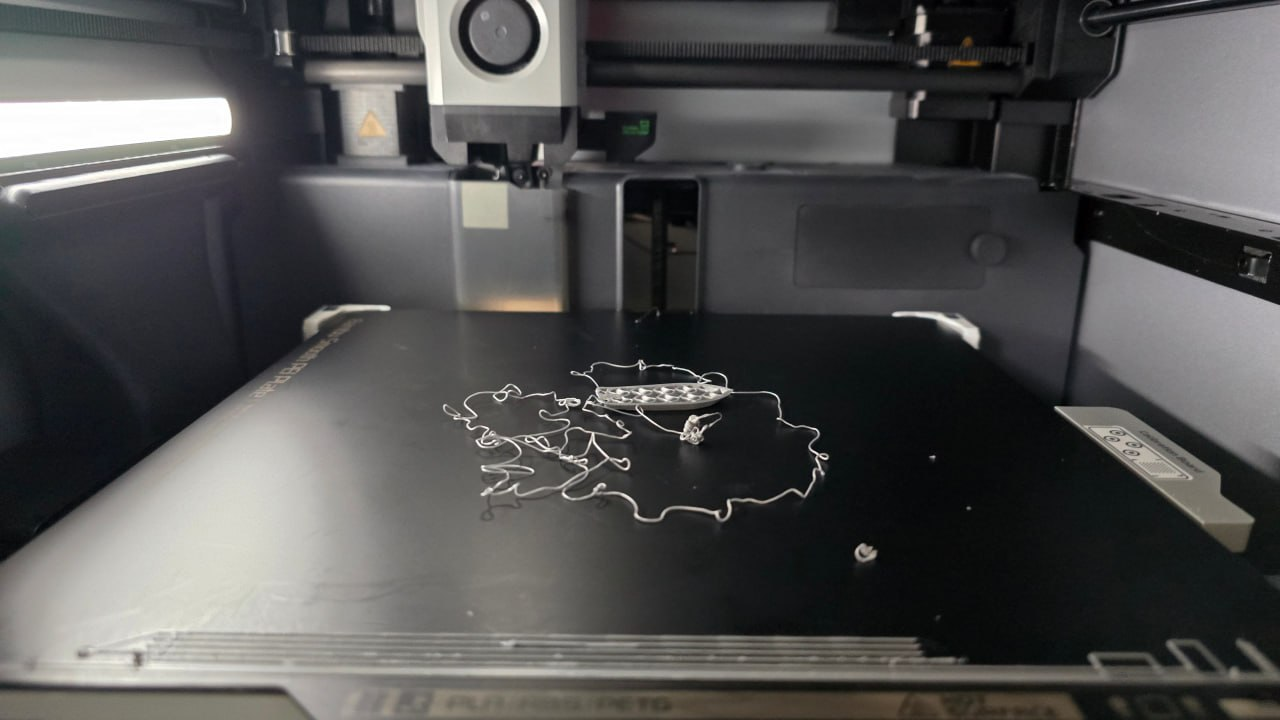
Quick answer
On Bambu Lab printers, first layer problems are usually caused by dirty plates, incorrect Z-offset after a firmware update, or wet filament. Run the built-in mesh calibration, clean the plate with isopropyl alcohol, verify the Z-offset on the screen (Settings → Fine Tune → Z Offset), and dry filament before printing. Most fixes take under 15 minutes.

Disclosure, before the squish begins
This post includes affiliate links, which means I may earn a commission if you buy through them. We print primarily on a Bambu Lab X1C, so the advice is written for Bambu printers but applies to most modern FDM machines.
If your issue is warping (first layer stuck, but corners lift later), start with the warping fix guide. If your issue is PLA surface quality, use the PLA settings guide.
Why the First Layer Matters More Than Anything Else
The first layer is the foundation of every 3D print. If it doesn't stick, nothing else matters, the best temperature profile in the world can't save a print that pops off the bed on layer one.
And unlike warping (which happens later) or stringing (which is cosmetic), first layer failures usually mean a total lost print. Wasted filament, wasted time, and that frustration that makes people put the printer in a closet.
On Bambu Lab printers specifically, the auto-bed-leveling and auto Z-offset calibration are genuinely good. Most first layer issues come down to three things:
- Dirty or worn build plate, the #1 cause
- Z-offset drift (after firmware updates, plate swaps, or nozzle changes)
- Wet filament, especially with PLA
Let's fix each one.
Fix 1: Clean the Plate (Seriously, This Fixes 60% of Problems)
I know, it's boring. But a fingerprint-smudged PEI surface is the single most common reason for first layer adhesion failure.
What to do:
- Wash with warm soapy water, dish soap, warm water, soft sponge. No abrasives. Rinse thoroughly, let air dry completely.
- Wipe with isopropyl alcohol (91% or higher), this removes the thin oil film your fingers leave. Do this right before printing, not yesterday.
- Never touch the print surface with bare fingers, gloves or a microfiber cloth if you need to reposition something.
When to do it: Deep wash the plate weekly (or every 10-15 prints). Quick IPA wipe before every print with sensitive materials (ABS, ASA, PETG).
If your PEI sheet is showing cracks, peeling coating, or permanent staining that won't come off with IPA, it's time for a replacement. Check out replacement textured PEI build plates. For routine cleaning, keep 91% isopropyl alcohol nearby.
Fix 2: Run the Auto-Calibrations (And Let Them Finish)
Bambu Lab printers have built-in mesh compensation and laser auto-leveling. These are your first line of defense.
How to run them:
- Open Bambu Studio (or the printer screen)
- Go to Settings → Maintenance → Mesh Compensation and run it
- Go to Settings → Maintenance → Laser Auto-Leveling and run it
- Wait for both to complete, don't interrupt
Important: If you recently changed the build plate, nozzle, or ran a firmware update, you should redo these calibrations. The stored mesh is only as good as the plate it was measured on.
Checking the Z-Offset Manually
The auto Z-offset calibration is a good starting point, but every printer is slightly different. Here's how to fine-tune it:
- On the printer screen: Settings → Fine Tune → Z Offset
- Home the printer, then adjust in 0.01mm increments
- The goal is a gap of roughly 0.1mm for PLA (thickness of a credit card, slightly less)
How to tell if it's right:
| Symptom | What's wrong | Fix |
|---|---|---|
| Filament barely touches the bed | Z-offset too high | Decrease Z-offset by 0.05mm |
| Filament squished into the bed | Z-offset too low | Increase Z-offset by 0.05mm |
| Slight resistance sliding paper underneath | Just right | Run a test print |
Run a small test print (the built-in calibration print in Bambu Studio works) after each adjustment. Small changes, test, repeat.
Fix 3: Dry Your Filament
Wet filament is a silent first layer killer. Moisture in PLA causes:
- Poor adhesion to the bed
- blobbing and popping sounds during extrusion
- Rough surface texture on the first few layers
How to check if your filament is wet:
- Listen for crackling/popping from the hotend during prints
- Look for white haze or cloudy sections on the filament
- If it's been sitting out for more than a few days, assume it's absorbing moisture
How to fix it:
- Run it through a dryer at 45-50°C for PLA, 55-60°C for PETG, for 4-6 hours
- Store spools with desiccant packs in sealed containers
- Don't leave spools exposed to air between prints
This is especially critical in humid climates or seasons. If you're in a dry environment, you can get away with just a sealed bin + desiccant. Humid? Dryer is your friend.
Fix 4: Set the Right Bed Temperature and Speed for Your Material
Bambu Studio profiles are generally accurate, but a few tweaks make a difference:
| Material | Bed temp | First layer speed | Notes |
|---|---|---|---|
| PLA | 50-60°C | 20-30 mm/s | Don't overheat, causes elephant foot |
| PETG | 70-85°C | 20 mm/s | Higher temp helps adhesion |
| ABS / ASA | 90-110°C | 20 mm/s | Enclosure required |
| TPU | 40-50°C | 10-15 mm/s | Slow first layer is critical |
Lower the first layer speed by 30-50% from your normal printing speed. Bambu Studio lets you set this in the print profile. The extra time pays off in adhesion.

Juno's rule
Always test Z-offset changes with a small print, not a 12-hour model. The paper test gets you close; actual extrusion tells the truth. And keep a basic tool kit handy, you'll need a spudger or spatula when prints decide they're done.
Fix 5: Use the Right Build Plate Surface
Bambu Lab printers come with a textured PEI plate, which is excellent for PLA and PETG. But different materials play better on different surfaces:
- Textured PEI (default): Best all-around. Great PLA and PETG adhesion. Prints pop off when cool.
- Smooth PEI: Better surface finish on the bottom, but can be too sticky (ABS especially). Use with caution, can damage plates on removal.
- Glass: Smooth finish, good for ABS, but requires adhesive (glue stick or hairspray). More work, less convenient.
For most beginners, the default textured PEI is the right choice. Just keep it clean.
Fix 6: Enable the Right Adhesion Settings
Bambu Studio has built-in adhesion helpers. Use them:
- Brim: Adds a flat perimeter around your model. Increases surface area for adhesion. Best for small or tall prints. Set to 3-8mm width.
- Raft: Creates a thick base platform underneath your model. Extreme adhesion helper, but wastes material and ruins bottom surface quality. Use only for problematic prints (small footprints, flexible materials).
- Skirt: Doesn't help adhesion, it just primes the nozzle. Skip it for first layer issues; use brim instead.
Start with a brim (5mm width) on any print that's smaller than 60mm on the shortest dimension. Skip it for large prints that already have good bed contact.
Common First Layer Problems and Quick Fixes
"My print lifts at the corners"
Cause: Bed temperature too low, plate dirty, or Z-offset too high at the edges.
Fix: Clean the plate, re-run mesh calibration, increase bed temp by 5°C, add a brim.
"The first layer looks squished and stretched"
Cause: Z-offset too low, nozzle is pressing into the bed.
Fix: Increase Z-offset by 0.05mm increments. Test after each change. Also check that your nozzle isn't bent (replace if damaged).
"It sticks at first but pops off halfway through"
Cause: Usually thermal, either the bed cooled too much, or you're printing a temperature-sensitive material (ABS) without an enclosure.
Fix: Enable the Bambu's chamber heater if available (X1C), or add an enclosure. For PLA, this usually means the plate needs cleaning.
"Random spots don't stick"
Cause: Warped or dirty plate, or the mesh calibration is off.
Fix: Wash the plate thoroughly, re-run mesh compensation. If the PEI sheet is warping (visible bowing), replace it.
The First-Layer Checklist
- Wash the build plate with dish soap and avoid touching the print area.
- Wipe with isopropyl alcohol right before printing.
- Run mesh compensation and laser auto-leveling (especially after firmware updates or plate changes).
- Verify Z-offset with the paper test, then confirm with a small test print.
- Dry filament before printing, especially PLA and PETG that's been sitting out.
- Slow the first layer to 20-30 mm/s (10-15 for TPU).
- Set the correct bed temperature for your material.
- Use a brim (5-8mm) for small or tall prints.
- Store filament with desiccant packs between prints.


Bottom line
First layer issues on Bambu Lab printers are almost always fixable without buying anything. Clean the plate, run the calibrations, check the Z-offset, dry the filament, and slow down that first layer. Most problems disappear in under 15 minutes.
If you're still struggling after these steps, the issue is usually the plate itself, worn, warped, or damaged PEI surfaces need replacement, not troubleshooting. Our maintenance tools guide covers what to stock. Next reads: why 3D prints warp and what fixes it, best PLA settings for cleaner prints, and best filament for Bambu printers.
Related Posts
Troubleshooting
Best PLA Settings for Cleaner 3D Prints in 2026
The best PLA settings for cleaner 3D prints: temperature, speed, cooling, first layer, retraction, flow, supports, and Bambu Studio tweaks that actually matter.
2026-04-27Troubleshooting
Why 3D Prints Warp and What Actually Fixes It in 2026
Why 3D prints warp, curl, or lift from the bed, and the practical fixes that actually work: clean plates, bed temperature, brims, cooling, enclosures, and material choices.
2026-04-27Troubleshooting
How to Stop PETG Stringing; Settings That Actually Work in 2026
How to Stop PETG Stringing; Settings That Actually Work in 2026
2026-04-26This page may contain affiliate links. As an Amazon Associate I earn from qualifying purchases.